Techmobile
Affichage des articles dont le libellé est computers. Afficher tous les articles

samedi 15 octobre 2016

The Windows Version of Lenovo's Hybrid Tablet

Ever since Lenovo unveiled the Yoga Book in late August, I’ve been extremely excited to get my hands on it. This folding tablet-laptop hybrid is unlike any other product on the market, as it takes the concept of the 10-inch tablet with a keyboard and replaces the cumbersome docking mechanism with the Yoga series’ signature 360-degree hinge.
The resulting hardware is a beautifully slim tablet that folds apart like a book, transforming it into a lightweight, portable laptop. Lenovo is aiming for the best of both worlds here: a compact tablet that’s easy to hold and transport; and an on-the-go laptop that isn’t hindered by an awkward dock, mediocre keyboard case, or confusing tablet stand.
To achieve this goal, naturally there are some trade-offs. There is a keyboard attached to this tablet, however there are no physical keys; you’re typing on a touchscreen slate.
It’s not particularly powerful either, packing an Intel Atom x5-Z8550 processor and 4 GB of RAM.
To make up for these, Lenovo has packed in a range of compelling stylus features. The touchscreen keyboard slate can be used as an accurate graphics tablet with the included pen, or you can slap a piece of paper on the slate and write physical notes while they are simultaneously digitized.
Lenovo also claims the Yoga Book is good for 13 hours of battery life, which sounds impressive considering its size.
The Yoga Book ($550 running Windows, $500 on Android) is one of the most attractive pieces of hardware I’ve used this year. The magnesium-aluminium alloy shell is sleek and gives this product a premium aesthetic, especially combined with Lenovo’s watchband hinge. The frosted glass touchpad complements the design well, as does the glossy glass protecting the display. There are very few distracting elements as well, aside from some removable stickers from Intel and Microsoft, which helps deliver the minimalist look this tablet deserves.
The most impressive aspect to the Yoga Book is how compact the entire device is. It’s a 10-inch tablet, so we were always getting a portable footprint, however the slimness is the key to this design’s success.
The Yoga Book is just 9.6mm thick when closed, which is unbelievable for a device that opens into two sections. The base, which includes the touch slate, is a slight wedge that maxes out at just over 6mm thick, while the display lid is a slender 3.5mm. When open, the Yoga Book looks astonishing.
Of course a 9.6mm thick 10-inch tablet isn’t hugely impressive, so if the Yoga Book were merely a standard tablet I wouldn’t be raving about the thickness. The impressive feat here is getting the Yoga Book in its closed tablet mode to match typical 10-inch tablets, while still featuring a hinge that allows it to open into a laptop. There is no product on the market that achieves this, and that’s what makes the Yoga Book stand out from such uninteresting competition.
The Yoga Book is one of the most attractive pieces of hardware I’ve used this year.
In its tablet mode, the 690-gram device is quite usable, but don’t expect an experience that rivals the Apple iPad Air 2. Not only is the iPad several hundred grams lighter, but it also features a more comfortable 4:3 screen aspect ratio. The 16:10 display on the Yoga Book makes it a little awkward to use as an entertainment device like the iPad, but it’s clear that the strengths of this tablet lie in productivity and creativity instead.
The watchband hinge that connects the two halves of the Yoga Book is as beautiful as it has been on past Lenovo convertibles. The hinge allows 36-degrees of fluid movement, yet it’s strong enough that any position you choose will be maintained in a reasonably stable fashion. I say “reasonably” because there is some wobble in the display half when using the touchscreen in laptop mode, however, despite this, the angle of the hinge is maintained.
The touch slate section is interesting as it serves two functions. When typing, the backlit keys appear from nowhere to provide a full keyboard with function keys and a trackpad. But when you hit the pen button, the keyboard disappears and the slate can be used as a graphics tablet within the printed bounds that match the size of the Yoga Book’s display. You can still see the outline of the keyboard under light, but the dual-function design is effective.
Around the edges of the touch slate is where you’ll find all the key ports and buttons. The right side includes a 3.5mm audio jack, the power button, and the volume rocker, as well as one speaker grill for the stereo side-firing speakers. I did find myself accidentally hitting the power button a few times while I was using the Yoga Book as a laptop due to its awkward position, and I’d rather the power and volume buttons were switched.
On the left side is a rather odd combination of ports: microUSB for charging and accessories, along with micro-HDMI. The Yoga Book is a device crying out for USB-C, so the inclusion of microUSB instead is baffling. And it’s not a size issue: there’s enough thickness in the Yoga Book to comfortably slot in USB-C, which would have provided greater compatibility with upcoming accessories and removed the need for the HDMI port (USB-C can be easily adapted to full-sized HDMI or DisplayPort).
The inclusion of microUSB over USB-C indicates to me that the Yoga Book has been in development for a long time, and near-final hardware was locked in before USB-C began its surge in late 2015. USB-C is a really disappointing omission from the Yoga Book, but at least with a microUSB to USB adapter you can still attach regular accessories.
The Yoga Book also includes a nano-SIM tray for integrated 4G LTE functionality, and two cameras: one for selfies above the display, in the Book’s large bezels; and another above the backspace key in the touchscreen slate. This seems like a weird position for a secondary camera, but when you fold the device into tablet mode, this camera becomes rear facing. Both cameras are pretty average in terms of quality, so I wouldn’t want to take any holiday photos on this tablet.

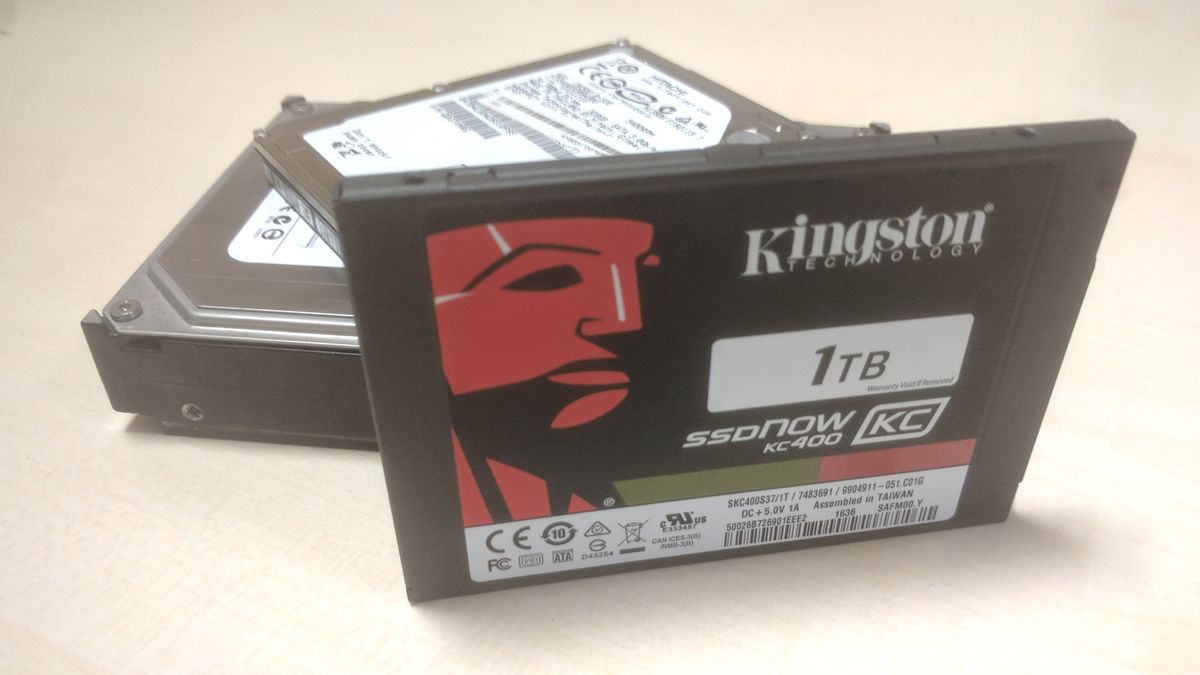
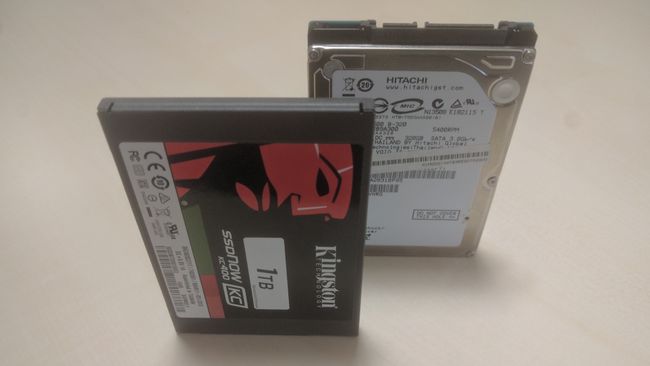
The Kingston 1TB SSDNow KC400 is a hard drive that sets out to change perceptions. It’s long been assumed if you want impressively fast data transfer rates you need an SSD (solid state drive), as the lack of moving parts means it’s not relying on how fast a disc can spin to get at your data, but if you want large storage capacity, a traditional hard drive is the way to go. 
For many people the way around this was to have an SSD dedicated to booting the operating system and some core programs, with a second larger HDD for storing files and programs. Not ideal, especially for laptop owners who can only fit in one 2.5-inch drive into their device.
The Kingston 1TB SSDNow KC400 eliminates this problem in some aspects by including a very large 1TB of capacity into a single 2.5-inch SATA 3.0-capable SSD drive.   
We say ‘some aspects’ as there is still a big reason why large capacity SSDs won’t be suitable for everyone – price. The Kingston 1TB SSDNow KC400 costs around £320 (around $400, AU$520), which is pretty steep when you consider that a regular 1TB hard drive can be had for as little as £45 (around $55, AU$75). So while the Kingston 1TB SSDNow KC400 tries to solve the conundrum of whether to have speed or capacity, it introduces a new one: is that combination worth the expense? 

Features and specification

The Kingston 1TB SSDNow KC400 is the latest drive in Kingston’s SSDNow line of products, and it also comes in 128GB, 256GB and 512GB capacities. It features a Phison PS3110-S10 8-channel controller and quad-core processor, which Kingston claims makes it 15 times faster than a standard hard drive.
The KC400 SSD is geared towards business use with end-to-end data path protection and SmartECC flash controller technology from Phison, which protects against NAND wear-out and protects data against unexpected power loss. To further protect your files, SmartRefresh tools rebuild data if there’s an error, and Kingston provides a free downloadable SSD Manager software application to help manage and monitor the SSD. A five year warranty with free technical support is included, and the MTBF (Mean Time Between Failures) is 1 million hours. Kingston is pretty confident that the 1TB SSDNow KC400 is a highly dependable hard drive for storing important files.
As well as the £320 (around $400, AU$520) Kingston 1TB SSDNow KC400, the 128GB version costs £60 (around $70, AU$100), the 256GB version costs £100 (around $125, AU$165) and the 512GB version costs £160 (around $200, AU$260). All capacities have pretty much the same features, though the lower capacities are capable of slightly faster read and write times, which means if you want to save money by getting a smaller capacity, you’re not sacrificing anything else but disk space.

Performance

According to Kingston, the 1TB SSDNow KC400 has sequential read/write speeds of up to 550 and 530MB/s respectively, and in the CrystalDiskMark benchmark tests we ran, which measures read and write speeds, the 1TB SSDNow KC400 actually surpassed it with 560.8MB/s read and 536.6MB/s write speeds. 
The ATTO benchmarks provided similarly rosy results, as it tested the read and write speeds of the drive using increasingly large files. The drive’s speed was pretty consistent at around 560.4MB/s read, 532MB/s write.
These raw numbers makes the speed difference between a HDD and SSD clear. Our recent review of the Seagate IronWolf 10TB sang its praises for reaching read speeds of 250.2 MB/s and write speeds of 229.2 MB/s, which is undeniably impressive for a HDD, but less than half the speeds of the Kingston 1TB SSDNow KC400.
In our real-world test, where we moved a 6.5GB file onto the KC400, it took 1 minute 34 seconds to complete. This is pretty impressive, though not that much faster than a standard hard drive’s results of 1 minute 38 seconds. Of course, the bottleneck here is probably the standard hard drive the file is being moved from – if we were transferring the same file between SSDs, the results would likely be lower.
We also ran PCMark 8 benchmarks which delivered a score of 4959, scoring higher than the Crucial BX100 SSD (which got 4814), but lower than the Samsung 850 Pro’s score of 5042.

vendredi 14 octobre 2016

By default, Google Chrome does not offer you a lot of options in the Settings section, and only just vB's basic that you can change it to any person as he wants. But there is a hidden section of this browser, where you can users technicians activated and piloted in their browser, some of the settings of this section are usually in a trial period before a formal proposition in your browser. In this post we will learn about some of the great features that deserve to be known to everyone.
Of course experienced users are well aware of the existence of a hidden section of Google Chrome settings, which you can access them by typing the following command chrome: // flags in your browser.
1. activation of smooth scrolling
Some confusion probably will notice and Altqtaat use of mouse or arrow keys to move to the bottom and the top of any page or site you're browsing Google workers Chrome, but now you can bypass this matter in an easy way, which is to activate the feature, "" saluting you will notice after activating the scroll at any site speed or page browse. To activate it all you have is to go to this link chrome: // flags / # smooth-scrolling, and make the "enable" for this feature, and you restart your browser.


2.altgm to stop and play audio from any tab
Google Chrome came an important advantage in the modern version of it, this feature is the icon that appears in Altbooibh which emits sound, saluting This feature lets you know Altbooibh that export volume in the case opened numerous tabs. But what if you want to control to stop sound from any tab without stopping the video or audio player within the page? Yes now you can turn off the sound from any tab for a way to activate this feature in Google Chrome hidden settings, go to the following link chrome: // flags / # enable-tab-audio-muting, and activate the feature work "enable".


3.tsria close open tabs
This option makes makes Chrome faster and more responsive and faster browsing. Where this feature enables you to speed up the closure of the open tabs faster regardless of the associated process. To activate this option, go to the following link chrome: // flags / # enable-fast-unload and make "enable".

4. QUIC protocol
QUIC a Quick UDP Internet Connections new protocol and a demo developed by Google, is designed to speed up your Internet connection, rather than the current TCP. Although this protocol does not use on a very large scale, but for servers, Google will allow you to speed up access and connect to it. To activate it go to the next track chrome: // flags / # enable-quic been Make "enable".

Google Inc. unveiled a new version of the Web browser, "Google Chrome" where he will carry this new version number, version 54, and will come as the company with a number of features and new additions.

And it confirms the new version of the Google Chrome browser renewed willingness of Google Inc. to take away from the flash technology and focusing more and more on HTML 5 technology, which will transform the content of Web pages that integrate YouTube videos by default HTML 5 technology.

She stressed that Google embarked on this step in order to ensure optimal protection of the browser with the development of its capabilities, in addition, the new version of Google Chrome will come private security update package 21 hole inside the browser, including the six bear the stamp of risk, and will bring the new version of the browser number Features of private developers.

The new version of Google Chrome and bearing the number 54 version available on Windows systems, Mac and Linux.

To download the latest version of the Google Chrome browser offers you a professional blog through the following link: Google Chrome 54

mercredi 12 octobre 2016

On Allonturnt there exist many and many of the programs that work to retrieve Mahdovh files and the professional code already, and we have introduced many and many programs through the same process but some programs may not retrieve all the files so in front of you option is to keep the experience of all the programs working to retrieve the files.
So today we will review before you "Wondershare Data Recovery" and a program through which you can retrieve your files Mahdovh either from a computer or on the Usb or Memory Card etc .. to indicate there Nshh free and paid the difference copy of this is that the free version can not do which Mahdovh refund of files with large size unlike the paid version in which you can do so.
The beauty of the program because it provides you to choose the quality of Mahdovh files you want to retrieve it for MS Office Word files, Exel, PDF etc .. Ballladhavh to images, audio MP3 means you select the quality of the files, and you click on the Scan to be the work of a thorough examination, and began to retrieve files .